 Firnity Discord for Confluence
 A notification rule combines a Confluence source, event types, optional filters, one Discord destination, card content, and delivery timing.
Choose the source and events
Global rules can watch All pages, Selected spaces, or one Selected page. Space rules can watch all pages in that space or one selected page in the same space.
Choose one or more events:
- New page
- Update
- Comment
The page and space pickers search live Confluence content available to the administrator. If a saved space later becomes unavailable to that account, it remains selected as Needs attention so it can be removed deliberately.
If a page is new and does not appear in search, paste its URL from the current Confluence site into the page picker to load it directly with your Confluence access. In Space Settings, the page must belong to the current space.
Narrow the activity
Filters can match title, labels, parent page, original author, or last updater. Choose whether all filters or any filter must match. A rule without filters uses only its source and events.
Choose the destination and card
Choose Discord channel to send the notification to a connected server channel. Threads are not offered as rule destinations. A channel marked Needs access is visible but lacks required permissions. A saved channel marked Unavailable cannot be used for save or preview until access is restored or another destination is selected.
Choose Direct message to send the notification privately to one linked Discord member. Search for a member and select one result. The recipient must have a connected Discord account and be visible through your current Confluence access. Channel permission statuses do not apply to direct-message destinations.
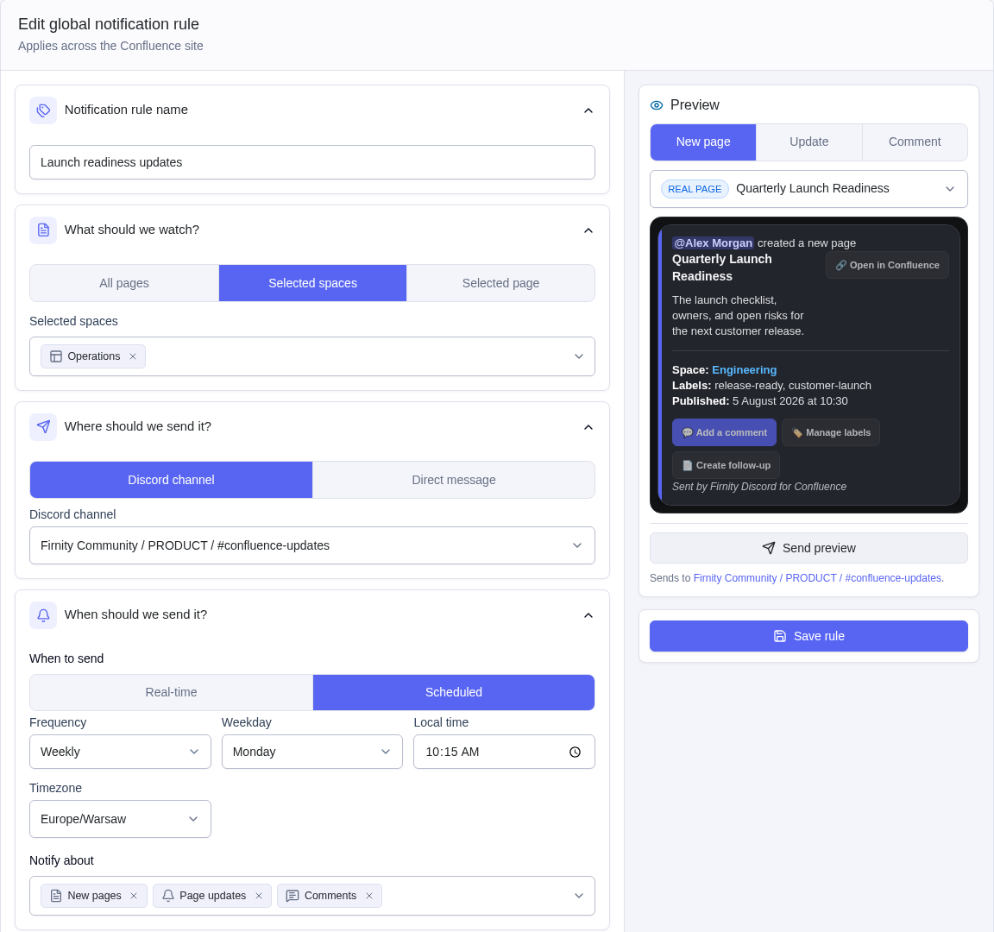
Choose which page or comment details appear on the card. Card Language localizes generated labels and dates. It does not translate Confluence content or custom button labels. The available languages are English (US), Português (Brasil), Español, Polski, Français, 日本語, Deutsch, 한국어, 繁體中文, Italiano, Bahasa Indonesia, Türkçe, and Nederlands.
Keep Confluence formatting
When page or comment content is included, the in-app preview and delivered Discord card preserve supported Confluence headings, nested numbered and bulleted lists, bold, italic, underline, strikethrough, inline and block code, quotes, line breaks, safe links, dates, and emoji. Mentions, statuses, and formatting without a Discord equivalent remain readable as text. Unsafe links are not made clickable.
Quick actions can add Add comment, Manage labels, or Create child page buttons when the page context supports them.
Preview, save, and monitor
The New page, Update, and Comment preview tabs update with the draft. Send preview sends the active preview to the selected destination without saving or enabling the rule. Save rule stores the current rule independently.
Each saved card explains When it watches for changes and Then where it sends notifications. Filters stay visible under the trigger, using and when all must match or or when any may match. One badge shows the current state: Active, Off, Waiting, or an issue requiring attention. Latest delivery activity appears beside the title. Turning a rule off does not show a route warning; blocked routes explain the problem and recovery. The editor retains scheduled timing. Open History to see Confluence and Discord links, timestamps, scheduled items, sent messages, and failures. The card’s Edit, History, Duplicate, and Delete actions are shown directly below it. Delete asks for confirmation before removing the rule.
A failed attempt is not automatically retried. Check the destination before another attempt because Discord may have accepted a message before the app recorded completion.