 Firnity Discord for Confluence
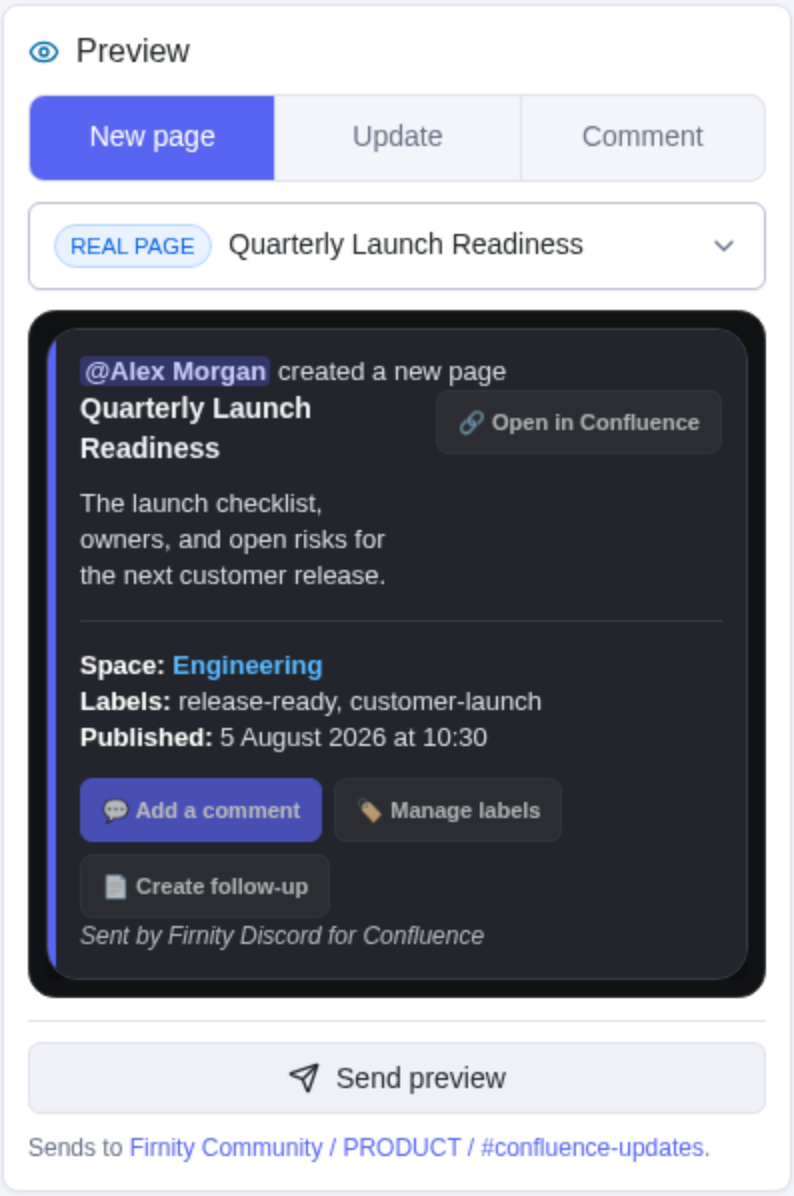
 Supported page cards can show quick actions when the source page is known:
- 💬 Add comment
- 🏷️ Manage labels
- 📄 Create child page
An administrator chooses which actions appear and may customize the complete button label. Every action that changes Confluence uses your linked Atlassian identity.
Add a comment
Select Add comment, enter the comment in the private Discord prompt, review the target page, and confirm. The comment is created only if your linked identity can comment on that page.
Manage labels
Select Manage labels to load the page's current labels privately. Deselect a visible label to remove it, or choose Add label to enter one new label. Discord selectors show up to 25 choices. When a page has more labels, Remove another label lets you remove an overflow label by name.
After a successful change, the private panel reloads from Confluence so it reflects the current labels.
Create a child page
Select Create child page, enter the requested content, review the target parent, and confirm. The child page uses your linked identity and the same attachment limits as other create-page workflows.
If a card does not show an expected action, the administrator may not have enabled it, the card may lack page context, your account may not be linked, or your Confluence permissions may not allow the operation.
ReferenceSee every built-in command →